A simple readability guide for clearer, smoother, more reader-friendly content.
Your reader may want the answer.
They may like your topic.
They may even need what you are teaching.
But then they open the post on their phone.
The first paragraph looks heavy. The subheads feel vague. The steps are buried somewhere in the middle.
Their thumb pauses for a second.
Then they leave.
Not because your idea was bad.
Because the page felt like work.
That is the quiet danger of hard-to-read content.
A useful post can still lose readers if the reading experience feels crowded, slow, or difficult to follow.
The good news?
You do not need to become a fancy writer to fix this.
You only need to make the page easier on the reader’s eyes, brain, and patience.
That is what readability does.
It helps your reader stay with you long enough to understand, trust, and use what you are sharing.
Why Readability Matters More Than You Think
People rarely read online in perfect conditions.
They may be standing in line for coffee.
They may be sitting on a bus.
They may be reading on a small phone screen after a long day.
They scan.
They pause.
They look for the part that helps them most.
If your post feels heavy, they may leave even when the content is useful.
That is frustrating, isn’t it?
You worked hard to explain something helpful, but the page itself got in the way.
Good readability clears the path.
It helps readers:
- understand your point faster
- stay with the article longer
- find the sections they need
- remember the lesson more easily
- take action without feeling overwhelmed
Think of your article like a small shop.
If the walkway is blocked, the shelves are crowded, and nothing is labeled clearly, people may walk out even if the products are good.
Readability clears the walkway.
It helps readers find what they came for.
The Big Mistake Beginners Make
The big mistake is making the reader work too hard.
Many beginners think good writing means adding more.
More detail.
More explanation.
More examples.
More background.
Sometimes, yes, detail helps.
But often, the better move is not adding more.
It is making the page easier to move through.
Think of a messy hallway.
Everything may technically fit in the hallway, but if boxes are stacked everywhere, walking through it feels annoying.
Your article can feel the same way.
Too much text packed too tightly makes readers slow down, stumble, or leave.
The solution is not to make your content shallow.
The solution is to create a clearer path.
That is where a readability pass helps.
The 5-Part Readability Pass
Before you publish your next post, run through these five checks.
You do not need to rewrite everything.
You only need to make the post easier to read, easier to scan, and easier to use.
The five checks are:
- Shorten the paragraphs
- Use clear subheads
- Add examples readers can picture
- Use bullets where they help
- Keep each section focused
Let’s walk through each one.
Step 1: Shorten the Paragraphs
Long paragraphs can make a page feel heavy, especially on mobile.
A paragraph that looks fine on a desktop can become a wall of text on a phone.
Keep most paragraphs to one to three sentences.
Sometimes one sentence is enough.
Short paragraphs create breathing room.
They also help readers move through the article without feeling trapped.
If a paragraph looks like a brick, break it.
Your reader should not have to climb over the text to reach the idea.
Quick Check
Look at your post on a phone if you can.
If one paragraph fills too much of the screen, split it.
Step 2: Use Clear Subheads
Subheads are signposts.
They tell the reader where they are and what is coming next.
A clever subhead may sound nice, but if it does not guide the reader, it is not doing its job.
For example, a vague subhead might be:
Make It Better
That does not tell the reader much.
A clearer subhead could be:
Break Long Paragraphs Into Shorter Sections
Now the reader knows exactly what the section is about.
Clear subheads help people scan your post before they commit to reading it.
They also help tired readers find the part they need most.
Quick Check
Read only your subheads from top to bottom.
Do they tell a clear story?
If someone only scanned the headings, would they understand the path of the article?
If not, make the subheads more specific.
Step 3: Add Examples Readers Can Picture
Examples turn advice into something real.
Without examples, your post may sound correct but still feel hard to apply.
For example, this advice is true:
Create a weekly cleaning routine.
But it is broad.
A clearer example would be:
Choose one small task for each weekday. Wipe the kitchen counter on Monday, vacuum the living room on Tuesday, clean the bathroom sink on Wednesday, and leave Saturday for anything you missed.
Now the reader can picture it.
They can see the week.
They can imagine doing the task.
That is the power of a useful example.
A good example does not need to be long.
It just needs to make the idea easier to understand.
Quick Check
Look for one section that feels vague.
Ask:
Can I show what this looks like in real life?
Step 4: Use Bullets Where They Help
Bullets are useful when a sentence has several pieces inside it.
They make steps, lists, signs, options, and reminders easier to scan.
For example, instead of writing:
Before cleaning, gather your cloth, spray, rubbish bag, laundry basket, and timer so you do not keep stopping halfway through the task.
You could write:
Before cleaning, gather:
- a cloth
- cleaning spray
- a rubbish bag
- a laundry basket
- a timer
That is easier on the eyes.
The reader can scan it quickly.
But do not turn everything into bullets.
Too many bullet lists can make the post feel like notes instead of a guide.
Use bullets when they make the idea easier to follow.
Quick Check
Find one crowded sentence with three or more items.
Turn it into bullets.
Then read it again.
If it feels lighter, keep the bullets.
Step 5: Keep Each Section Focused
Each section should have one main job.
If one section tries to explain too many things, the reader may feel lost.
For example, a section about a weekly cleaning routine should not also explain storage bins, laundry systems, deep cleaning, home decor, and productivity habits.
Those may all be useful.
But not in the same section.
A focused section helps the reader relax.
They know what they are learning.
They can follow the idea without untangling five thoughts at once.
Quick Check
For each section, ask:
What is the one idea here?
If the answer is unclear, split the section or remove the extra idea.
Worked Example: Making a Cleaning Routine Post Easier to Read
Let’s use a simple example.
Imagine you have a post called:
How to Create a Weekly Cleaning Routine
The topic is useful.
But the draft feels heavy.
Maybe the intro is long.
Maybe the steps are buried inside paragraphs.
Maybe the subheads are vague.
Maybe the reader cannot quickly see what to do.
Here is how a readability pass could improve it.
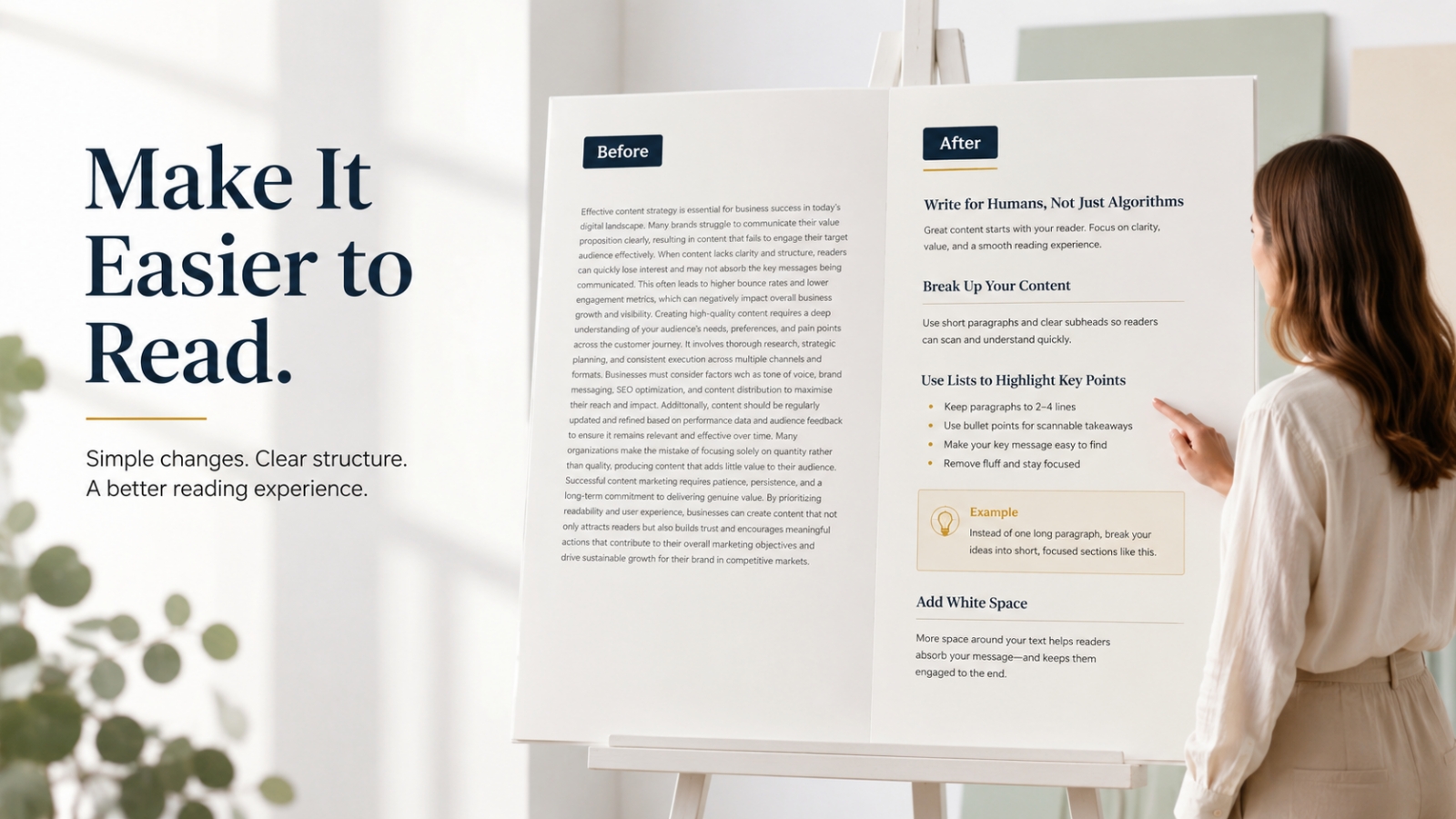
Before: Heavy Version
Cleaning your house regularly is important because it helps you keep your space neat, comfortable, and more pleasant to live in. Many people struggle with cleaning because they are busy, and they may not know how to divide tasks across the week. One way to solve this problem is to create a weekly cleaning routine that includes different tasks on different days so you do not have to clean everything at once.
This paragraph is not terrible.
But it feels heavy.
It has several ideas packed together:
- cleaning matters
- people are busy
- cleaning feels hard
- tasks can be divided across the week
- a routine can help
Now let’s make it lighter.
After: Easier-to-Read Version
Keeping the house clean can feel harder when every task waits for the weekend.
By Saturday, the laundry is full, the floors need attention, and the bathroom is asking for help.
A weekly cleaning routine makes the work lighter by spreading small tasks across the week.
You do not need to clean everything in one day. You only need a simple rhythm you can repeat.
This version is easier to read because it gives the reader space.
The idea is the same.
But the page feels lighter.
Before: Buried Steps
To create your routine, you should first list the cleaning tasks you need to do, then choose which ones are daily, weekly, or occasional, and after that you can assign tasks to different days based on your schedule and energy level.
That sentence contains useful advice.
But it is crowded.
Now let’s turn it into a clearer list.
After: Clear Steps
To create your routine:
- List the cleaning tasks you need to do.
- Mark each task as daily, weekly, or occasional.
- Choose one or two tasks for each day.
- Match harder tasks with days when you have more energy.
- Keep one day lighter for catching up.
Now the reader can follow it.
They are not digging through one long sentence.
The steps are visible.
Before: Vague Subheads
Getting Started
Making It Work
Final Tips
These headings are common, but not very helpful.
They do not tell the reader what each section will do.
After: Clearer Subheads
List the Cleaning Tasks That Repeat Every Week
Spread the Tasks Across Different Days
Keep the Routine Small Enough to Repeat
Now the headings guide the reader.
They also make the article easier to scan.
What Changed?
The improved version has:
- shorter paragraphs
- clearer subheads
- simple bullets
- one main idea per section
- a practical next step
That is what readability does.
It helps the reader move.
How to Improve Your Own Draft
You do not need to rewrite the whole article in one sitting.
Start with one readability pass.
Think of it like tidying a room before guests arrive.
You are not rebuilding the house.
You are clearing the path.
Check the Paragraphs
Look for paragraphs that run too long.
Ask:
Can I break this into two or three smaller pieces?
Shorter paragraphs often make the post feel lighter right away.
Check the Subheads
Read only the subheads from top to bottom.
Do they tell a clear story?
Can the reader understand the path of the article from the headings alone?
If not, make them clearer.
A good subhead should help the reader think:
“Okay, I know what this section is for.”
Check the Examples
Look for examples that sound vague.
Add details the reader can picture.
Instead of saying:
Plan your tasks better.
Say:
Choose laundry for Wednesday night and place the basket near the washing machine before dinner.
Specific beats blurry.
The more clearly the reader can picture the example, the easier it is to understand.
Check the Lists
If one sentence contains three or more items, consider turning it into bullets.
Bullets help when they make the idea easier to absorb.
They are especially useful for:
- steps
- questions
- checklists
- signs
- options
- reminders
But do not turn everything into bullets.
Too many bullets can feel choppy.
Use them when they help.
Check the Focus
Look at each section and ask:
What is the one idea here?
If the section tries to do too much, split it.
If it drifts away from the point, trim it.
Your reader should not have to untangle five ideas at once.
What to Avoid When Improving Readability
Mistake 1: Keeping Giant Paragraphs
A giant paragraph can scare readers away before they begin.
Even good advice feels heavy when it is packed too tightly.
Give your ideas space.
Mistake 2: Using Clever but Unclear Subheads
Clever headings can be fun, but clarity comes first.
If the reader does not know what the section means, rewrite it.
Guide first.
Be clever only if clarity stays intact.
Mistake 3: Using Examples That Feel Too General
Examples should bring the idea closer to real life.
If the example could apply to anything, make it more specific.
A good example lets the reader say:
“I can picture that.”
Mistake 4: Overusing Bullets
Bullets help when they organize information.
But if the whole article becomes bullets, it can feel like notes instead of a guide.
Use a mix of short paragraphs and lists.
That rhythm feels more natural.
Mistake 5: Packing Too Many Ideas Into One Section
If one section feels crowded, the reader will feel crowded too.
Give each idea its own space.
A section should guide, not overwhelm.
A Simple Readability Checklist
Before publishing, use this quick checklist.
Paragraphs
- Are most paragraphs one to three sentences?
- Are long blocks broken up?
- Does the page feel light enough to read on mobile?
Subheads
- Do the subheads clearly guide the reader?
- Can someone scan them and understand the post?
- Are the headings specific instead of vague?
Examples
- Are the examples easy to picture?
- Do they match the reader’s situation?
- Do they make the idea clearer?
Bullets
- Are lists easy to scan?
- Did you turn crowded sentences into bullets where helpful?
- Are the bullets short and useful?
Focus
- Does each section cover one main idea?
- Did you remove off-topic points?
- Does the article move in a clear order?
You do not need to make the post perfect.
Just make it easier to read.
That alone can make the article much stronger.
Quick Exercise: Do a 10-Minute Readability Pass
Choose one draft or older post.
Set a timer for 10 minutes.
Then do these five things.
Step 1: Break One Long Paragraph
Find one heavy paragraph and split it.
Give the reader some breathing room.
Step 2: Improve One Subhead
Make one heading clearer and more useful.
Do not try to sound clever first.
Try to guide first.
Step 3: Add One Simple Example
Choose one vague idea and show what it looks like in real life.
A small example can make a big difference.
Step 4: Turn One Crowded Sentence Into Bullets
Find a sentence with several points and make it easier to scan.
Do not overthink it.
Just make it easier on the reader.
Step 5: Check One Section for Focus
Ask whether that section is trying to say too much.
If yes, split it or remove the extra idea.
That is it.
Ten minutes.
One readability pass.
Small edits can make a post feel much easier to finish.
Final Thought: Make the Reader’s Job Easier
A readable post does not mean a shallow post.
It means you care enough to make the lesson easier to receive.
You give the reader space.
You guide their eyes.
You keep each section focused.
You show examples they can picture.
That is not “just formatting.”
That is good teaching.
So before you publish your next post, do one final pass and ask:
Am I making this easy for my reader to follow?
If the answer is yes, your post has a better chance of being read, remembered, and used.
And that is the real goal.
Use This With Blogger’s Success Toolkit
If you already own Blogger’s Success Toolkit, log in to the Blogger Success Blueprint members area and use the writing and planning resources to review your next post before publishing.
Do one readability pass for paragraphs, subheads, examples, bullets, and section focus.
Members Login:
https://bloggersuccessblueprint.com/members/
New to Blogger’s Success Toolkit?
Blogger’s Success Toolkit gives you a beginner-friendly path to choose your direction, plan useful content, write stronger titles, and begin building your blog with more structure.