Turn a folder of PLR files into a clear offer page that explains the problem, the path, and the value.
The Sales Page Mistake That Makes PLR Feel Small
You open your PLR folder and start building a sales page.
The first thing you see is the file list.
A guide.
A workbook.
A checklist.
A few templates.
Maybe some email swipes and graphics.
So you copy the list onto the page.
It feels honest. It feels complete. It feels like you are showing everything the buyer will receive.
But then the page feels flat.
It reads like an inventory sheet.
There is no pull.
No clear reason to care.
No strong sense of what the product actually helps the buyer do.
That is where many PLR sales pages become weak.
They list the files, but they do not explain the value.
A good sales page does not only say, “Here is what is inside.”
It helps the buyer understand, “Here is why this matters to me.”
Why Offer Positioning Matters
PLR gives you pieces.
But your sales page must turn those pieces into an offer.
That is the difference.
A file list says:
“You get a guide, checklist, templates, and emails.”
An offer says:
“This helps you move from scattered product ideas to a simple, organized first offer you can prepare with more confidence.”
See the difference?
The first one describes contents.
The second one describes movement.
People care about movement.
They want to know what changes.
They want to know why this product is useful.
They want to understand how the pieces help them take the next step.
When your PLR sales page explains the problem, outcome, path, and value, the product feels clearer and more purposeful.
The Big Mistake: Selling the Folder Instead of the Result
Many beginner PLR sellers accidentally sell the folder.
They write things like:
- 25-page guide
- 10 templates
- 7 email swipes
- 5 checklists
- Cover graphic
- Sales page copy
There is nothing wrong with listing deliverables.
Buyers should know what they receive.
But if that is all the sales page does, the offer feels thin.
The buyer may think:
“Okay, but what do I do with this?”
That question matters.
A good sales page answers it before the buyer has to ask.
It explains the result.
It explains the use.
It explains the path.
It explains why the pieces belong together.
That is how a PLR product starts to feel like a helpful offer instead of a download folder.
The Simple PLR Sales Page Path
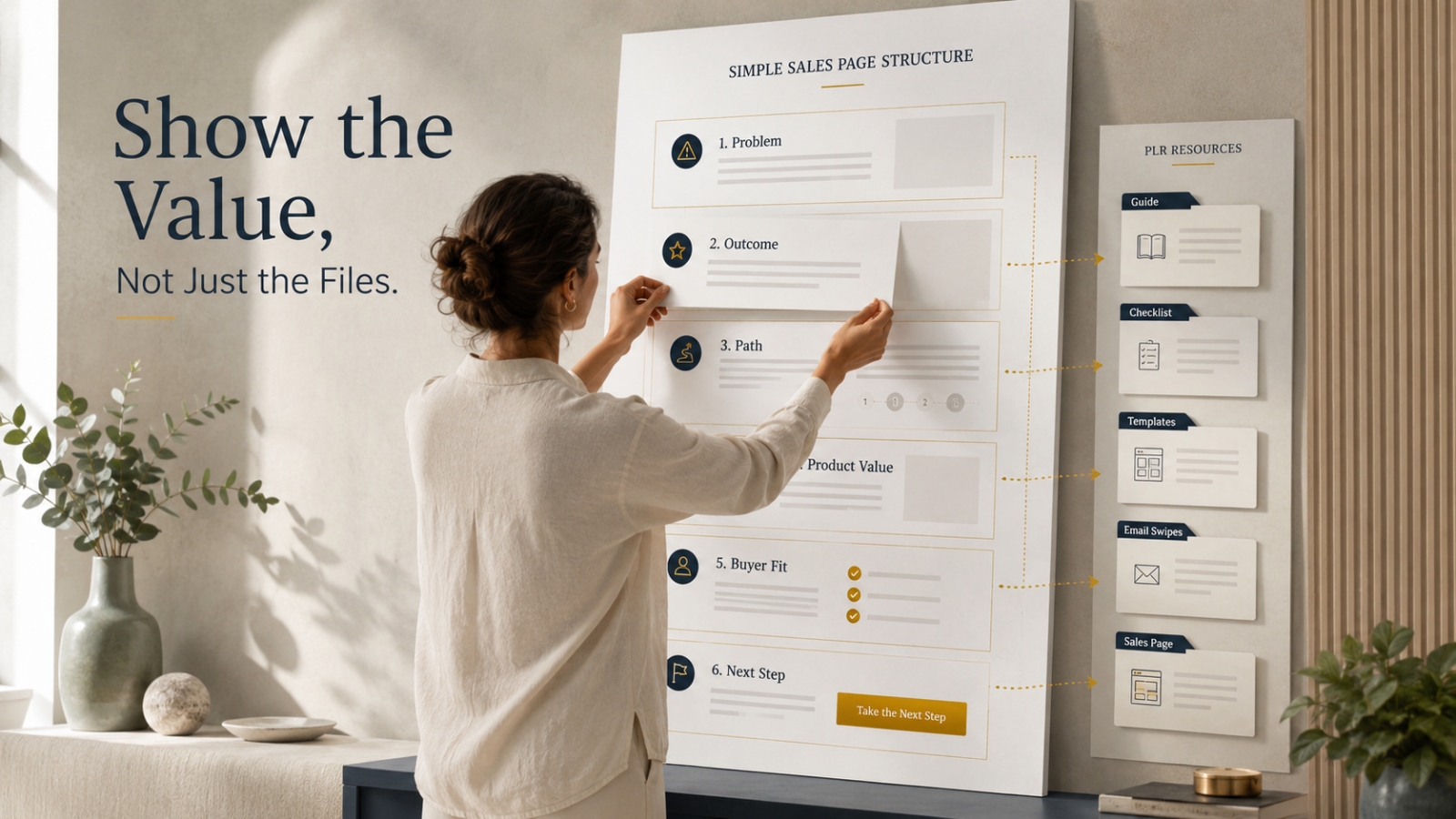
Use this framework when building a sales page from PLR.
It keeps the page simple, but it also gives the buyer enough context to understand the offer.
1. Start With the Problem
Before you list the product, explain the problem.
What is the buyer struggling with?
What feels messy, slow, confusing, or unfinished?
For example, let’s say you are turning a PLR package about digital product planning into a simple offer called:
First Offer Builder Kit
A weak sales page might open with:
“Inside this package, you get a guide, worksheets, templates, and email swipes.”
That is too soon.
A stronger opening starts with the buyer’s situation:
“You have an idea for a digital product, but the pieces still feel scattered. The topic is there. The outline is half-finished. The offer name keeps changing. And every time you sit down to move forward, you are not sure what to complete next.”
That opening gives the product a reason to exist.
Now the buyer understands the problem.
2. Show the Desired Outcome
After the problem, show the outcome.
What does the buyer want instead?
For the First Offer Builder Kit, the outcome could be:
“Move from a scattered product idea to a simple first offer with a clearer promise, basic structure, and next-step plan.”
That is specific.
It does not overpromise.
It gives the buyer a picture of progress.
The outcome does not need to sound dramatic.
It needs to feel believable and useful.
Ask:
- What does this product help the buyer organize?
- What does it help them finish?
- What does it make easier?
- What confusion does it reduce?
The answer becomes your outcome statement.
3. Explain the Path
A strong sales page should show how the product helps.
Not in a complicated way.
Just enough to help the buyer understand the process.
For example:
First Offer Builder Kit helps you follow a simple path:
- Choose one buyer problem
- Turn it into a clear offer promise
- Map the main product pieces
- Prepare the basic delivery experience
- Write simple launch messages
Now the buyer can see the journey.
They are not just buying random files.
They are buying a guided path.
This is especially important with PLR because the package may include many pieces. Your sales page should arrange those pieces into a logical flow.
4. Present the Product Value
Now you can explain what is included.
But do not only name the files.
Connect each file to its purpose.
Instead of writing:
“Offer Planning Worksheet”
Write:
“Offer Planning Worksheet — helps you turn one product idea into a clearer promise, audience, and outcome.”
Instead of writing:
“Email Swipes”
Write:
“Email Swipes — gives you a starting point for introducing the offer to your audience without staring at a blank page.”
Instead of writing:
“Checklist”
Write:
“Launch Readiness Checklist — helps you review the key pieces before you share the product.”
That is a much stronger value presentation.
The file name tells what it is.
The short explanation tells why it matters.
5. Add Trust Through Clarity
Trust does not always come from testimonials.
Sometimes trust comes from clear explanation.
A buyer feels safer when they understand:
- Who the product is for
- What it helps with
- What is included
- How to use it
- What it does not promise
- What to do after purchase
This matters even more with PLR.
If you are selling to PLR buyers, explain whether they can edit, brand, resell, or use the content in their own business.
If the product has usage rights, summarize them clearly and point buyers to the full license.
Do not make vague promises.
Do not imply instant results.
Show the product clearly.
Clear positioning builds confidence.
A Quick Before-and-After Example
Before sales page angle:
Get this complete digital product planning PLR pack with guide, worksheets, templates, emails, and graphics.
After sales page angle:
Turn one product idea into a simple first offer with a clearer promise, organized product pieces, and ready-to-adapt launch materials.
Before product list:
- Guide
- Worksheet
- Checklist
- Emails
- Sales page
After value stack:
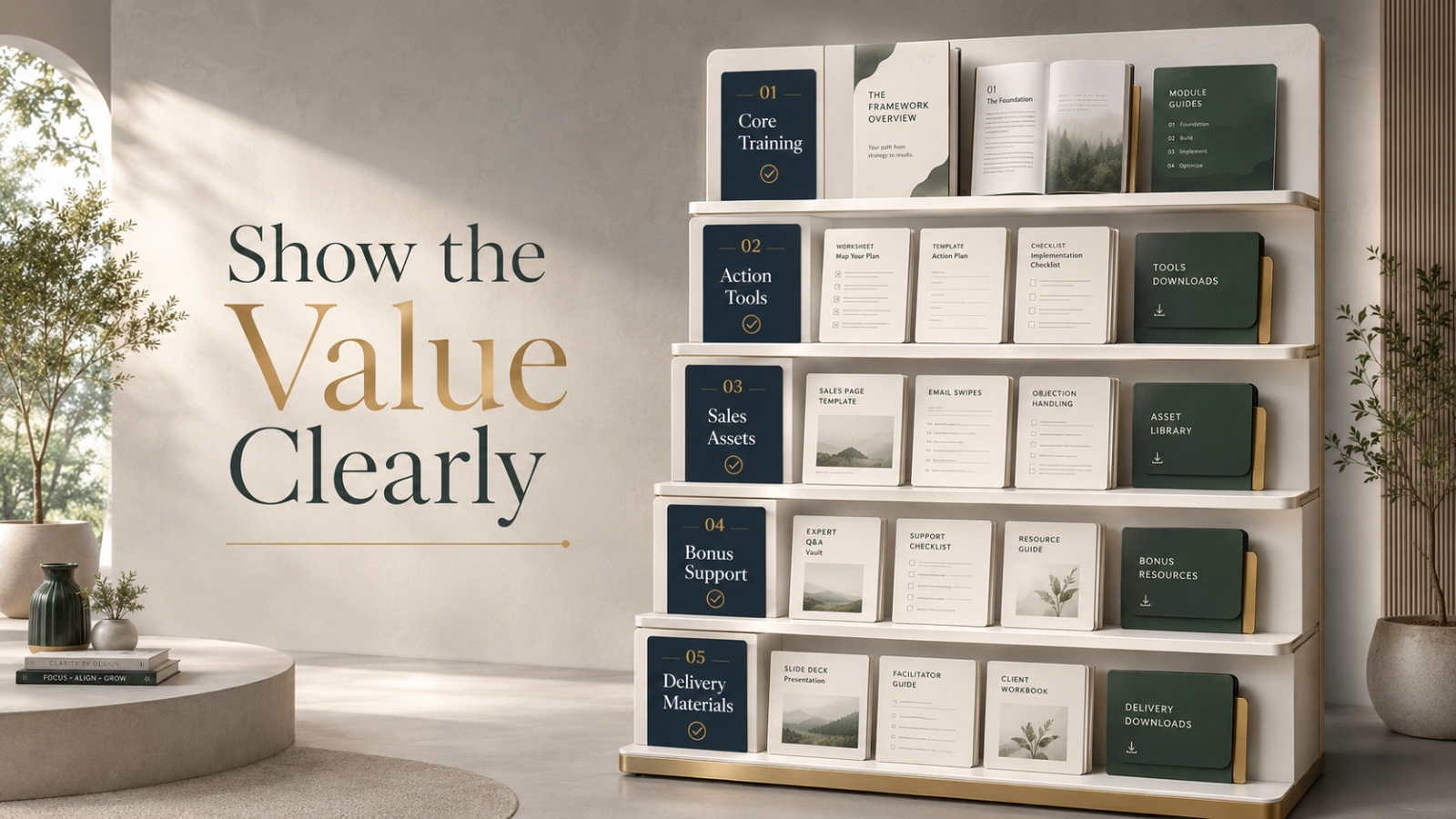
- First Offer Guide — helps you understand the simple path from idea to offer
- Offer Planning Worksheet — helps you shape your buyer, promise, and outcome
- Launch Readiness Checklist — helps you review the key pieces before publishing
- Email Swipe Set — gives you a starting point for introducing the offer
- Sales Page Template — helps you explain the problem, path, product, and next step
Same PLR package.
Very different sales page.
The first version lists files.
The second version explains value.
What Every Simple PLR Sales Page Should Include
You do not need a complicated sales page to begin.
A simple sales page can work if it explains the offer clearly.
Here is a practical structure.
Section 1: Clear Headline
Your headline should show the main outcome.
Example:
Build Your First Simple Digital Product Offer Without Starting From Scratch
This is better than:
Complete Digital Product PLR Pack
Why?
Because the first headline explains movement.
The second headline only names the package.
Section 2: Short Subheadline
The subheadline should add clarity.
Example:
A ready-to-adapt planning kit that helps you shape one product idea into a clearer offer, delivery path, and launch message.
This explains what the product helps with.
Section 3: Problem Section
Show the buyer’s current struggle.
Keep it specific.
Example:
“You may have product ideas, notes, and half-finished files, but no clear offer path yet. That makes it hard to know what to finish, how to package it, and how to explain it to buyers.”
This makes the reader feel understood.
Section 4: Outcome Section
Show what the product helps them move toward.
Example:
“This kit helps you organize one product idea into a simple offer with a clearer promise, product structure, and next-step launch plan.”
This gives direction.
Section 5: Product Path
Explain how the product works.
Use simple steps.
Example:
- Start with one buyer problem
- Shape the offer promise
- Organize the product pieces
- Prepare the delivery experience
- Use the launch messages as a starting point
This helps the buyer see the path.
Section 6: What Is Included
List the deliverables, but explain the benefit of each one.
Example:
- Offer Guide — understand the full path before you start editing
- Planning Worksheet — map the audience, promise, and outcome
- Checklist — review the core pieces before publishing
- Email Swipes — adapt launch messages faster
- Sales Page Template — explain the offer without starting from a blank page
This is much stronger than a plain file list.
Section 7: Who It Is For
Make the best-fit buyer clear.
Example:
This is for beginner digital product creators, PLR buyers, and small online business owners who want a simpler way to shape one idea into a usable offer.
This helps the right person recognize themselves.
Section 8: Who It Is Not For
This can build trust.
Example:
This is not for someone looking for advanced funnel automation, complex launch strategy, or instant-result promises. It is for people who want a simple, structured starting point.
That keeps expectations realistic.
Section 9: How to Use It
Give simple usage instructions.
Example:
Start with the guide, complete the planning worksheet, review the checklist, then adapt the sales page and emails around your final offer.
This reduces buyer confusion.
Section 10: Clear CTA
Your CTA should be simple.
Example:
Get First Offer Builder Kit
Or:
Start Building Your First Simple Offer
Avoid making the CTA confusing.
One clear next step is enough.
How to Turn File Lists Into Value Bullets
This is one of the fastest ways to improve a PLR sales page.
Take every file and ask:
“What does this help the buyer do?”
Then rewrite the bullet.
File-Based Bullet
Includes 10 email swipes.
Value-Based Bullet
10 Email Swipes — gives you ready-to-adapt messages for introducing your offer with more confidence and less blank-page stress.
File-Based Bullet
Includes a sales page template.
Value-Based Bullet
Sales Page Template — helps you explain the buyer problem, offer path, product value, and next step in a simple structure.
File-Based Bullet
Includes a checklist.
Value-Based Bullet
Launch Readiness Checklist — helps you review the key pieces before sharing your offer.
This one change can make the sales page feel much stronger.
You are still being honest about what is included.
You are simply helping the buyer understand why each piece matters.
What to Add Before Publishing the Sales Page
Before you publish a sales page from PLR, improve these areas.
Improve the Headline
Does it explain the result?
Does it speak to the buyer’s real problem?
Does it feel specific enough?
Improve the Promise
Is the promise believable?
Does it match what the product actually includes?
Does it avoid hype?
Improve the Product Path
Can the buyer see how the pieces work together?
Does the page explain the order or process?
Improve the Value Stack
Does each deliverable include a short benefit?
Or is it only a file list?
Improve the Buyer Fit
Does the page explain who the product is for?
Does it also clarify who it is not for when useful?
Improve the Delivery Experience
If the buyer purchases, what happens next?
Check:
- Are the files clearly named?
- Is there a Start Here guide?
- Are downloads arranged in the right order?
- Are formats labeled clearly?
- Does the buyer know what to open first?
- Is the support link easy to find?
The sales page creates the expectation.
The delivery page must support that expectation.
Common Mistakes to Avoid
Mistake 1: Leading With the File Count
“100 files included” may sound big, but it can also feel overwhelming.
Lead with the problem and outcome first.
Then show the files as supporting pieces.
Mistake 2: Using a Generic Headline
A headline like “Complete PLR Package” does not explain enough.
Make the headline outcome-based.
Mistake 3: Listing Features Without Benefits
A feature says what the buyer gets.
A benefit says why it matters.
You need both.
Mistake 4: Making the Offer Sound Bigger Than It Is
Do not turn a simple product into a dramatic promise.
If the product helps with a first offer, say that.
You do not need to promise a complete business transformation.
Mistake 5: Forgetting the Buyer’s Next Step
After reading the page, the buyer should know what to do.
Your CTA should be clear.
Your delivery should be clear.
Your product path should be clear.
The Simple PLR Sales Page Checklist
Use this checklist when building or improving a sales page from PLR.
Problem
- Does the page explain the buyer’s current struggle?
- Does it feel specific?
- Does the reader feel understood?
Outcome
- Does the page show what the product helps the buyer move toward?
- Is the promise believable?
- Is the result clear?
Path
- Does the page explain how the product helps?
- Are the steps easy to follow?
- Do the pieces feel connected?
Product Value
- Are deliverables explained with benefits?
- Does each item have a purpose?
- Is the value easy to understand?
Buyer Fit
- Does the page say who it is for?
- Does it avoid trying to speak to everyone?
- Does it clarify who it is not for if needed?
Trust
- Are claims realistic?
- Are PLR rights explained clearly when relevant?
- Does the page avoid hype and vague promises?
Delivery
- Does the buyer know what happens after purchase?
- Are files arranged clearly?
- Is there a Start Here guide or usage note?
Quick Action Exercise
Choose one PLR product and open its file list.
Then complete this exercise.
Step 1: Write the Problem
What is the buyer struggling with before they need this product?
Write one short paragraph.
Step 2: Write the Outcome
What does the product help them move toward?
Write one clear sentence.
Step 3: Write the Path
List three to five steps the product helps them follow.
Step 4: Rewrite Three File Bullets
Choose three files from the PLR package.
For each one, write:
[File Name] — helps you [specific useful action].
Step 5: Write the Buyer Fit
Complete this sentence:
“This is for [specific buyer] who wants to [specific result] without [specific frustration].”
Now you have the basic structure for a simple sales page.
Not a file list.
A real offer page.
Final Encouragement
A sales page from PLR does not need to be complicated.
But it does need to explain the value.
Do not just list the files.
Show the problem.
Show the outcome.
Show the path.
Show why each piece matters.
That is how a simple PLR sales page starts to feel more like an offer and less like an inventory sheet.
And that is the goal.
Not to make the product look bigger.
To help the right buyer understand why it is worth their attention.
Use This With Blogger’s Success Toolkit
If you already own Blogger’s Success Toolkit, log in to the Blogger Success Blueprint members area and use the relevant planning tools, worksheets, or resources to apply this lesson.
Start with what you already have.
Open one product.
Choose one section.
Complete one small task.
Apply what you already own before adding anything else.
If you also own Blogger’s Success Accelerator System, use it for consistency and growth support.
If you own Blogger’s Success Ultimate Launch Kit, use it for setup and deployment support.
And if you own one of the lighter support paths, such as QuickGrow or QuickStart, begin there before adding anything else.
Members Login:
https://bloggersuccessblueprint.com/members/
New to Blogger’s Success Toolkit?
Blogger’s Success Toolkit gives you a beginner-friendly path to choose your direction, plan useful content, write stronger titles, and begin building your blog with more structure.