How to make your digital product easier to access, understand, use, and trust after purchase.
A buyer’s experience does not end at checkout.
It begins there.
That moment matters.
The buyer has just decided to trust you.
They clicked the button.
They completed the purchase.
They opened the confirmation email.
They entered the members area or download page.
Now they are quietly asking:
Where do I begin?
What did I buy?
What should I open first?
Which file matters most?
Do I need to download everything?
Where do I go if I need help?
If those questions are not answered clearly, the product can start to feel confusing before the buyer even uses it.
That is why delivery and onboarding matter.
A strong product is not only about what is inside.
It is also about how clearly the buyer can access it, understand it, and begin using it.
Why Buyer Experience Matters
A buyer may purchase because the offer sounds useful.
But they continue trusting you because the delivery feels clear.
A messy delivery experience can make even a good product feel weaker.
The buyer may feel overwhelmed.
They may not know which file to open first.
They may miss important resources.
They may never use the product fully.
They may contact support for questions that could have been answered on the download page.
That is not ideal.
A better buyer experience reduces friction.
It helps the buyer feel:
“I know where I am. I know what I bought. I know what to do first.”
That feeling builds trust.
The Big Mistake Product Creators Make
The big mistake is thinking product delivery is only about giving access.
The creator thinks:
“The buyer has the files. My job is done.”
But access is only one part of delivery.
The buyer also needs guidance.
A folder full of files is not the same as a clear product experience.
A members area with many downloads but no order can feel confusing.
A confirmation email without next steps can feel cold.
A bonus section with no explanation can feel like a storage room.
A product should not feel like the buyer walked into a warehouse.
It should feel like they walked into a simple, well-labeled learning space.
The Better Buyer Experience Framework
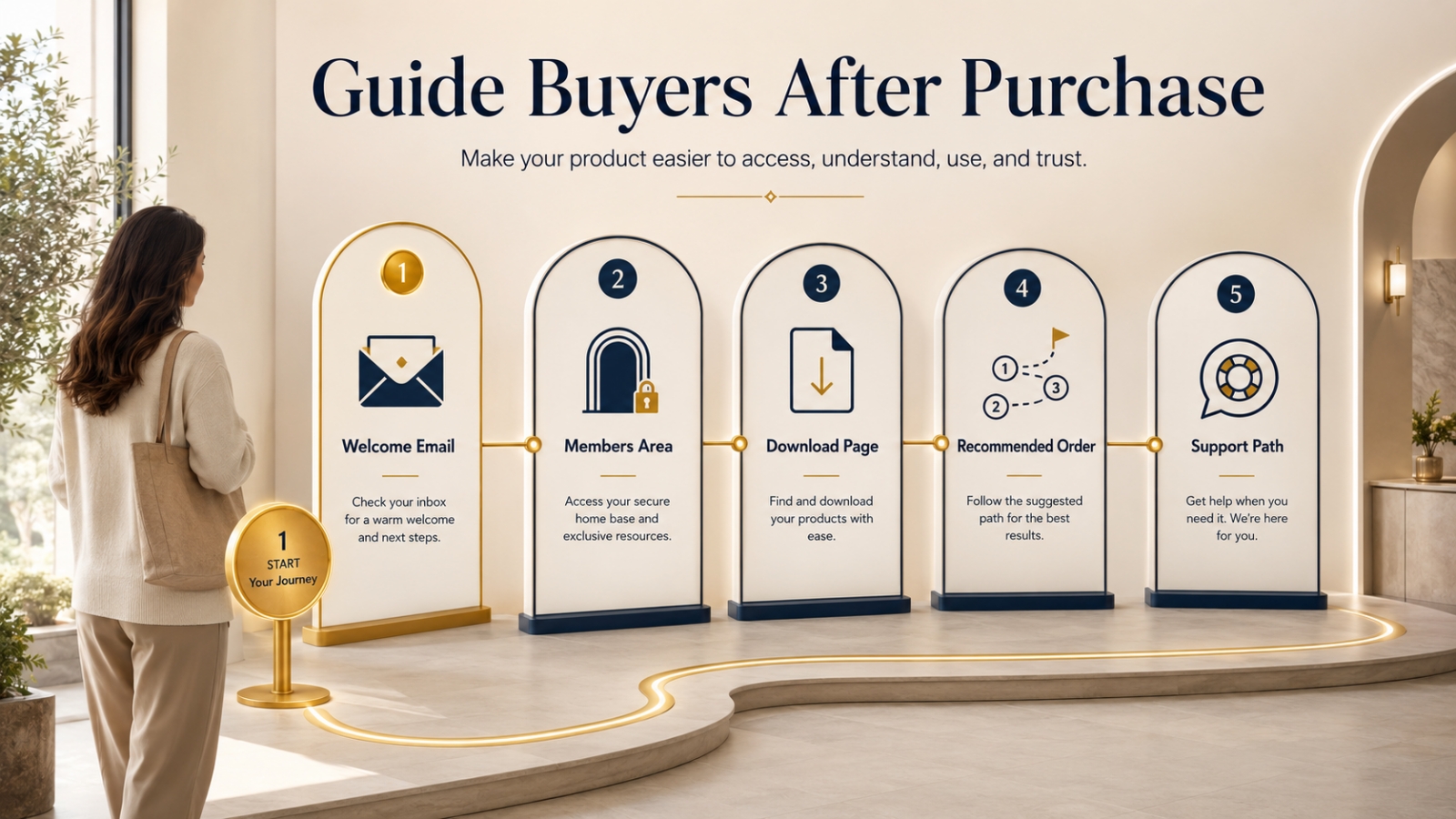
A good digital product experience needs five simple parts:
- Clean members area
- Clear download page
- Welcome email
- Recommended order
- Simple support path
These do not need to be fancy.
They need to be clear.
Let’s walk through each one.
1. Clean Members Area
Your members area should help the buyer feel oriented.
When they log in, they should quickly understand where things are.
A clean members area does not mean expensive design.
It means the layout is easy to follow.
The buyer should not need to hunt for the main product.
What a Clean Members Area Includes
A clean members area may include:
- clear product name
- short welcome note
- simple navigation
- main product section
- bonus section
- license or usage information if needed
- support link
- recommended order
- download buttons that are easy to find
Keep the structure simple.
Do not make the buyer click through too many pages before they can begin.
Members Area Question
Ask:
If a buyer logs in for the first time, can they understand where to start within 30 seconds?
If not, simplify the layout.
2. Clear Download Page
The download page is one of the most important buyer experience pages.
This is where the buyer receives the product.
A good download page should explain what each section is for.
Do not only list file names.
File names alone may not help the buyer understand the value.
For example, instead of only showing:
Module 1.pdf
Add a short explanation:
Module 1: Start Here Guide — Use this first to understand the product path and recommended order.
That small explanation helps.
What a Clear Download Page Includes
A clear download page should include:
- product title
- short welcome message
- “Start Here” section
- main product downloads
- bonus downloads
- recommended use order
- file format notes
- access instructions
- support link
The goal is to reduce guessing.
Download Page Question
Ask:
Can the buyer tell what each file is and why it matters?
If not, add short descriptions.
3. Welcome Email
The welcome email is the buyer’s first guided message after purchase.
It should be simple, warm, and practical.
The goal is not to sell again immediately.
The goal is to help the buyer access and use what they bought.
A good welcome email should include:
- thank you note
- access link
- what to do first
- recommended order
- support contact
- reassurance that they do not need to use everything at once
This helps the buyer feel guided.
Simple Buyer Welcome Email Example
Hi {{ customer.first_name | capitalize }},
Thank you for getting [Product Name].
You can access your product here:
[Insert Members Area Link]
I recommend starting with the Start Here Guide first. It will show you what is included, what order to follow, and how to use the main resources without feeling overwhelmed.
A simple order is:
- Read the Start Here Guide
- Open the main training or guide
- Use the worksheet or checklist as you go
- Review the bonuses after the main product
If you need help, you can contact support here:
[Insert Support Link]
Take it one step at a time.
Regards,
Peter Teo
That email is clear.
It tells the buyer what to do next.
Welcome Email Question
Ask:
Does this email help the buyer begin, or does it only give them a link?
A good welcome email guides.
4. Recommended Order
Many digital products include several parts.
Main guide.
Videos.
Worksheets.
Checklists.
Templates.
Bonuses.
License files.
Support documents.
If the buyer sees everything at once, they may not know what to open first.
That is why a recommended order matters.
You can say:
Start here. Then go here. Use this while you work. Open these bonuses after the main product.
This is simple, but powerful.
Example Recommended Order
For a digital product toolkit, the order might be:
- Start Here Guide
- Core Training Guide
- Action Workbook
- Templates
- Checklists
- Bonuses
- License and support documents
For a PLR product, the order might be:
- Read the Start Here Guide
- Review the PLR License
- Open the main product files
- Customize the editable files
- Review the sales materials
- Prepare your delivery page
- Use promotional assets when ready
The order should match the product.
Do not assume the buyer knows.
Recommended Order Question
Ask:
What sequence would help the buyer get value with the least confusion?
Then place that order clearly on the download page and in the welcome email.
5. Simple Support Path
A buyer should know where to get help.
Support does not need to be complicated.
But it should be visible.
A simple support path may include:
- support email
- support form
- FAQ page
- “How to access your files” section
- “What to do if a download does not work” note
- expected response window if relevant
This reduces frustration.
It also reduces repeated questions.
Support Path Example
You can write:
Need help? Visit the support page here: [Insert Support Link]. Please include your purchase email and a short description of the issue so we can help faster.
That is clear.
Support Path Question
Ask:
If the buyer gets stuck, can they quickly see where to go?
If not, make support easier to find.
Worked Example: Improving a Digital Product Delivery Page
Let’s imagine you sell a product called:
Starter Offer Builder Toolkit
The product includes:
- guide
- workbook
- offer promise template
- product format selector
- final review checklist
- bonus examples
Weak Delivery Page
The download page says:
Downloads:
- Guide.pdf
- Workbook.pdf
- Template.docx
- Checklist.pdf
- Bonus.pdf
This gives access, but not guidance.
The buyer may wonder:
Which file first?
What is the template for?
Do I need the bonus now?
How do these fit together?
Better Delivery Page
The page could be organized like this:
Welcome to Starter Offer Builder Toolkit
This toolkit helps you plan one small starter offer with a clear buyer problem, product format, promise, included pieces, and next step.
Start Here First
Start Here Guide
Read this first to understand what is included and how to use the toolkit in order.
Step 1: Clarify the Buyer Problem
Buyer Problem Worksheet
Use this to define the specific problem your starter offer will help solve.
Step 2: Choose the Product Format
Product Format Selector
Use this to decide whether your offer should be a guide, checklist, template, workbook, or starter kit.
Step 3: Write the Product Promise
Offer Promise Template
Use this to write a clear promise that helps buyers understand the value quickly.
Step 4: Build and Review the Offer
Final Offer Review Checklist
Use this before publishing or presenting the offer.
Bonus Support
Starter Offer Example Pack
Review these examples after completing the main worksheets.
Need Help?
Visit support here: [Insert Support Link]
This version feels much better.
It explains the product.
It guides the buyer.
It reduces confusion.
How Better Onboarding Builds Trust
Good onboarding is part of the product.
It helps buyers use what they bought.
It also affects how they feel about you.
When delivery is clear, buyers may think:
This person cares about my experience.
That matters.
A clear buyer experience can lead to:
- better product usage
- fewer support questions
- stronger trust
- better customer satisfaction
- more confidence in future offers
- fewer misunderstandings
- better perceived value
You do not need a complicated system.
You need a thoughtful one.
What to Avoid
Mistake 1: Listing Files Without Context
Do not only list file names.
Explain what each major file is for.
Mistake 2: Hiding the Start Point
The buyer should know what to open first.
Use a clear Start Here section.
Mistake 3: Sending a Bare Access Email
A purchase email should do more than provide a link.
It should guide the first step.
Mistake 4: Making Bonuses Compete With the Main Product
Bonuses should support the main product.
Place them after the core path unless they are needed earlier.
Mistake 5: Making Support Hard to Find
Do not bury the support link.
Make it visible on the download page and in the welcome email.
Quick Exercise: Improve Your Buyer Experience
Use this worksheet.
My Product Is:
[Write product name.]
The Buyer’s First Question After Purchase Is Likely:
[Write the question.]
My Start Here Section Should Say:
[Write a short welcome/start note.]
The Recommended Order Is:
- [Step/file 1.]
- [Step/file 2.]
- [Step/file 3.]
- [Step/file 4.]
- [Step/file 5.]
My Welcome Email Should Include:
- access link
- first step
- recommended order
- support link
- simple reassurance
My Support Path Is:
[Write support email, form, or page.]
One Thing I Can Make Clearer Is:
[Write one improvement.]
This exercise can improve almost any digital product delivery experience.
Final Thought: Make the First Step Easy
A better buyer experience does not require complicated technology.
It requires clarity.
A clean members area.
A clear download page.
A helpful welcome email.
A recommended order.
A simple support path.
These small pieces help buyers feel guided after purchase.
And when buyers feel guided, they are more likely to use the product.
That is the real goal.
Not just access.
Use.
Progress.
Trust.
So before creating another product, review your delivery experience.
Ask:
Can the buyer quickly understand where to begin and what to do next?
If the answer is yes, you are already creating a better buyer experience.
Use This With Blogger’s Success Toolkit
If you already own Blogger’s Success Toolkit, log in to the Blogger Success Blueprint members area and review your own product delivery or onboarding process.
Check your members area, download page, welcome email, recommended order, and support path. Improve one thing that would make the buyer’s first step easier.
Members Login:
https://bloggersuccessblueprint.com/members/
New to Blogger’s Success Toolkit?
Blogger’s Success Toolkit gives you a beginner-friendly path to choose your direction, plan useful content, write stronger titles, and begin building your blog or product path with more structure.