
Beginner-friendly ways to recommend useful resources without making your content feel forced
Affiliate content can feel intimidating when you are new.
You may picture long reviews.
Detailed product breakdowns.
Complicated tracking links.
Big comparison charts.
A polished sales message you are not sure how to write.
That can make the whole thing feel heavier than it needs to be.
But affiliate content does not have to begin with a massive review.
It can begin with something much simpler.
A helpful list.
A practical tutorial.
A clear comparison.
A beginner resource guide.
A simple “how I use this” post.
These content types work because they do not begin with pressure.
They begin with help.
And that is the right place to begin.
Why Simple Affiliate Content Works
The best beginner affiliate content helps the reader make a better decision.
That is it.
It does not need to be loud.
It does not need to convince everyone.
It does not need to make every product sound like the only option.
It only needs to help the right reader understand:
- what the resource does
- who it may help
- when it makes sense
- what to look out for
- what step to take next
That kind of content builds trust because it respects the reader.
You are not just placing links in front of them.
You are helping them think.
And when readers feel guided, affiliate recommendations feel more natural.
The Big Mistake: Starting With the Hardest Type of Affiliate Post
Many beginners think they need to start with a full product review.
That can work.
But it is not always the easiest first step.
A full review requires a lot of confidence.
You may need screenshots, use cases, pros and limits, feature explanations, who it fits, who it does not fit, and a clear final recommendation.
That can feel like a lot.
So instead of starting there, begin with simpler affiliate content types.
You can still recommend useful resources.
You can still include affiliate links where appropriate.
But the article feels more like teaching than selling.
That is a better starting point for most beginners.
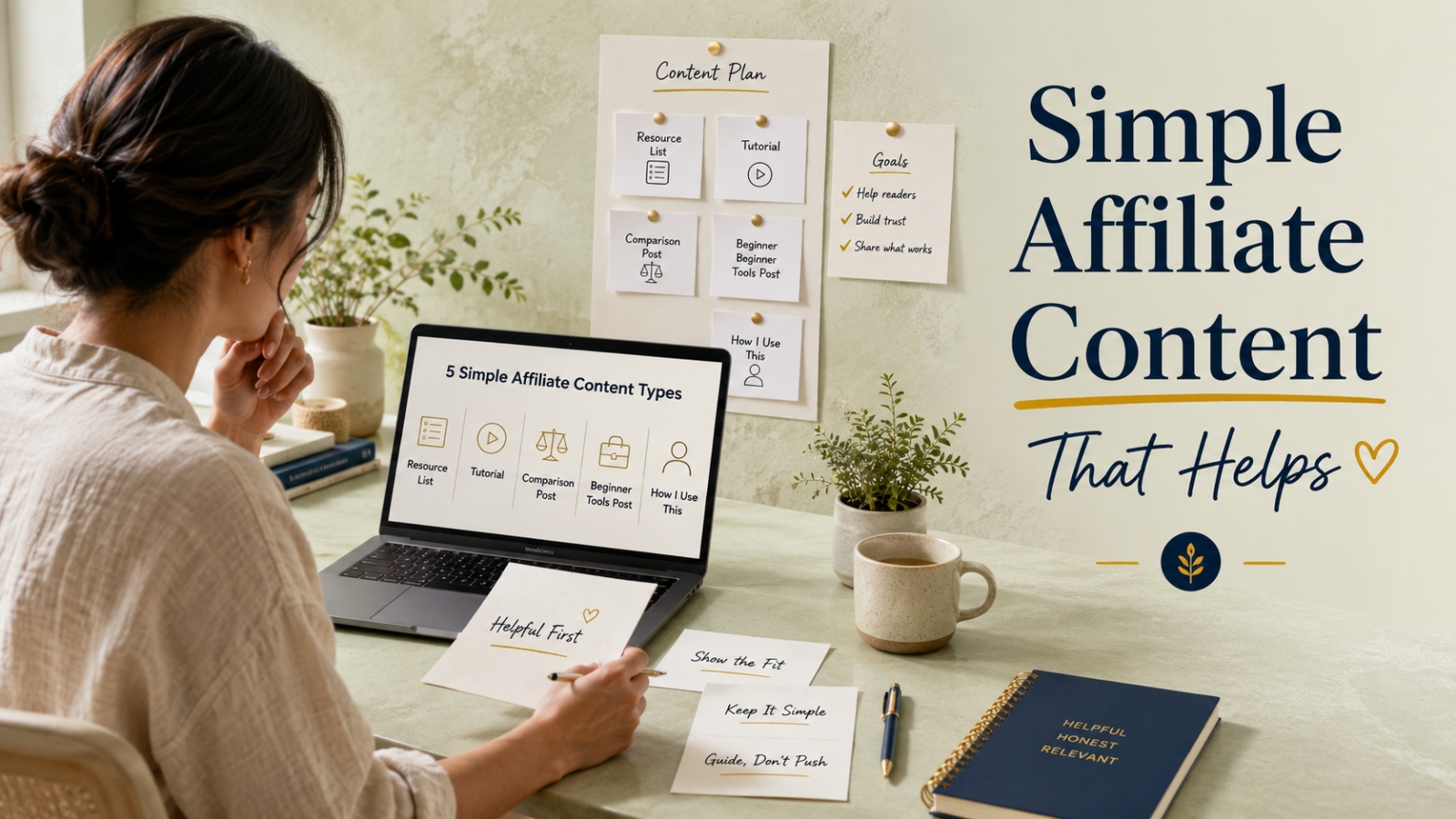
The 5 Simple Affiliate Content Types
Here are five beginner-friendly affiliate content types you can create.
- Resource list
- Tutorial
- Comparison post
- Beginner tools post
- “How I use this” post
Let’s walk through each one.
Type 1: Resource List
A resource list is one of the easiest affiliate content types to create.
It brings useful tools, templates, guides, or training resources into one helpful article.
The key is to organize the list around a clear reader problem.
For example:
Example Title
5 Simple Digital Marketing Resources That Help You Promote a Small Offer
This post could include:
- an email swipe template pack
- a simple sales page template
- a traffic training guide
- a launch checklist
- a follow-up email sequence guide
This works because the reader has a clear goal.
They want to promote a small offer, but they may not know what resources are useful first.
A resource list helps them see the pieces more clearly.
What to Include
For each resource, explain:
- what it is
- what it helps with
- who it fits
- when to use it
- what to skip if the reader is not ready yet
Why It Works
A resource list feels useful because it saves the reader time.
It reduces confusion.
It gives them a simple menu of options without making them search everywhere by themselves.
Type 2: Tutorial
A tutorial teaches the reader how to do something step by step.
The affiliate recommendation can fit naturally when the resource supports the process.
For example:
Example Title
How to Create a Simple 5-Day Email Promotion Plan
This tutorial could teach a simple process:
- Choose the product or offer
- Identify the reader’s main problem
- Write the first helpful email
- Add one proof or example email
- Send a final reminder email
Inside the tutorial, you could mention a helpful resource such as an email swipe pack or promotion planner.
But the post should not become only about the resource.
The main value is the teaching.
The recommendation supports the process.
What to Include
A strong tutorial should include:
- a clear outcome
- simple steps
- one worked example
- a common mistake to watch for
- one practical next step
Why It Works
Tutorials build trust because they help the reader act.
Even before they click any link, they should feel like they learned something useful.
That makes the recommendation feel more natural.
Type 3: Comparison Post
A comparison post helps readers choose between two or more options.
This is useful when people are unsure which path fits their stage.
For example:
Example Title
Email Swipe Pack vs. Full Promo Kit: Which One Fits Your First Campaign?
This post could compare:
Email Swipe Pack
Useful when the reader mainly needs help writing messages.
Full Promo Kit
Useful when the reader needs emails, page copy, social posts, and campaign structure.
The goal is not to make one option look good and the other look bad.
The goal is to help readers choose based on their need.
What to Include
A good comparison post should explain:
- what each option does
- who each option fits
- what each option may not include
- when to choose one over the other
- what the beginner should do first
Why It Works
Comparison posts build trust because they help readers avoid buying the wrong thing.
That is powerful.
When you honestly explain fit, your recommendation feels more useful.
Type 4: Beginner Tools Post
A beginner tools post helps readers understand the basic resources they may need for a specific task.
The word “tools” does not have to mean physical tools.
It can include templates, guides, software, checklists, or planners.
For example:
Example Title
Beginner-Friendly Resources for Creating Your First Simple Sales Page
This post could include:
- a sales page template
- a headline prompt sheet
- a benefit bullet checklist
- a simple offer outline worksheet
- a proof and FAQ planning guide
This works well because the reader is not searching for random products.
They are trying to complete one task.
The resources support that task.
What to Include
For each resource, explain:
- why it matters
- how it helps the task
- whether it is essential or optional
- how a beginner should use it first
Why It Works
Beginner tools posts reduce overwhelm.
They help readers understand what matters first and what can wait.
That is useful.
And useful content creates trust.
Type 5: “How I Use This” Post
A “how I use this” post shows how a resource fits into a real process.
This type of content feels personal and practical.
For example:
Example Title
How I Use a Simple Promotion Planner Before Writing Any Campaign Emails
This post could show:
- how you choose the reader problem
- how you map the offer angle
- how you outline the email sequence
- how you decide the first message
- how you keep the promotion organized
The affiliate resource is part of the workflow.
Not the whole story.
What to Include
A strong “how I use this” post should include:
- the problem you use it to solve
- the steps you follow
- what changed after using it
- who it may help
- who may not need it yet
Why It Works
This type of post feels less abstract.
Readers can see the resource in action.
It is not just a claim.
It is a demonstration.
Worked Example: Choosing the Right Affiliate Content Type
Let’s say your reader wants to promote their first small digital offer.
They feel unsure about what they need.
They have heard about emails, sales pages, traffic, checklists, and promo kits.
But it all feels like a messy desk.
Papers everywhere.
No clear order.
No obvious first step.
You could approach this in several ways.
Option 1: Resource List
5 Simple Digital Marketing Resources That Help You Promote a Small Offer
Best when the reader needs a broad overview of useful resources.
Option 2: Tutorial
How to Create a Simple 5-Day Email Promotion Plan
Best when the reader needs step-by-step action.
Option 3: Comparison Post
Email Swipe Pack vs. Full Promo Kit: Which One Fits Your First Campaign?
Best when the reader is choosing between options.
Option 4: Beginner Tools Post
Beginner-Friendly Resources for Creating Your First Simple Sales Page
Best when the reader wants to complete one specific task.
Option 5: “How I Use This” Post
How I Use a Simple Promotion Planner Before Writing Any Campaign Emails
Best when the reader wants to see the resource used in a real process.
Each post can include affiliate recommendations.
But each one has a different job.
That is what makes affiliate content more strategic.
How to Choose the Best Type for Your Next Post
Use this simple decision guide.
Choose a Resource List If…
Your reader needs a clear set of useful options.
This is good when they are asking:
“What resources should I look at first?”
Choose a Tutorial If…
Your reader needs a process.
This is good when they are asking:
“How do I do this step by step?”
Choose a Comparison Post If…
Your reader is deciding between two or more options.
This is good when they are asking:
“Which one fits me?”
Choose a Beginner Tools Post If…
Your reader needs help understanding the basic resources for one task.
This is good when they are asking:
“What do I actually need to get started?”
Choose a “How I Use This” Post If…
Your reader needs to see the resource in action.
This is good when they are asking:
“How would this work in real life?”
How to Keep Affiliate Content Trustworthy
Simple affiliate content still needs trust.
Before adding a link, ask yourself a few questions.
Does This Recommendation Fit the Reader?
Do not recommend something advanced to a beginner who needs a simple first step.
Can I Explain Why It Helps?
If you cannot explain the reason clearly, the recommendation may feel weak.
Have I Mentioned Who It Is Not For?
This makes your content more honest.
Not every resource fits every reader.
Does the Article Help Even Without the Link?
This is important.
The post should be useful even if the reader does not click.
That is how trust is protected.
Is the Next Step Clear?
Do not leave the reader confused.
Tell them what to do next based on their stage.
What to Skip When You Are Starting
Skip Overloading the Post With Too Many Links
Too many links can make the article feel crowded.
Start with a few relevant recommendations.
Skip Recommending Everything You Can Find
More is not always better.
Choose resources that fit the post’s purpose.
Skip Making Every Section a Pitch
Teach first.
Recommend when it helps.
Skip Using Products You Do Not Understand
If you cannot explain the resource in plain language, study it more before recommending it.
Skip Pretending One Resource Fits Everyone
A good recommendation has a clear fit.
Say who it helps most.
Quick Exercise: Plan Your First Simple Affiliate Post
Use this worksheet.
My Reader Is
[Describe one clear reader]
Their Problem Is
[Write the problem]
The Type of Affiliate Content I Will Create Is
[Resource list / tutorial / comparison post / beginner tools post / how I use this post]
My Working Title Is
[Write the post title]
The Resources I May Mention Are
- [Resource 1]
- [Resource 2]
- [Resource 3]
For Each Resource, I Will Explain
- what it does
- why it helps
- who it fits
- who may not need it yet
- what the reader should do next
If you can answer those points, you already have the foundation for a helpful affiliate post.
Final Thought: Start Simple and Stay Helpful
Affiliate content does not need to be complicated.
You do not need to begin with a giant review.
You can start with a simple resource list, tutorial, comparison post, beginner tools post, or “how I use this” article.
The format matters less than the intention.
Help the reader understand their options.
Explain the fit.
Be honest about limits.
Guide the next step.
That is how affiliate content becomes useful instead of uncomfortable.
Start simple.
Stay helpful.
Let trust lead the recommendation.
Use This With Blogger’s Success Toolkit
If you already own Blogger’s Success Toolkit, log in to the Blogger Success Blueprint members area and review one post idea where a helpful recommendation could fit naturally.
Choose one simple affiliate content type and shape the post around the reader’s problem first.
Members Login:
https://bloggersuccessblueprint.com/members/
New to Blogger’s Success Toolkit?
Blogger’s Success Toolkit gives you a beginner-friendly path to choose your direction, plan useful content, write stronger titles, and begin building your blog with more structure.

1 Response to "The Simplest Affiliate Content for New Bloggers"
[…] If you need ideas, start with The Simplest Affiliate Content for New Bloggers. […]